
G2 TweaksBox2.5.6 - Google Play
You'll be able to see results in few seconds.
Publisher Description
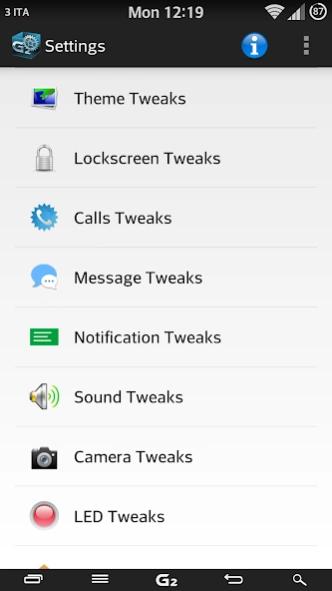
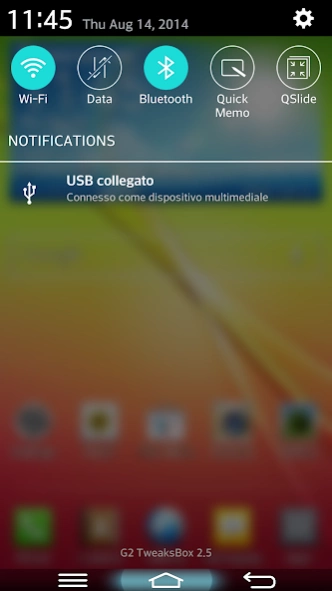
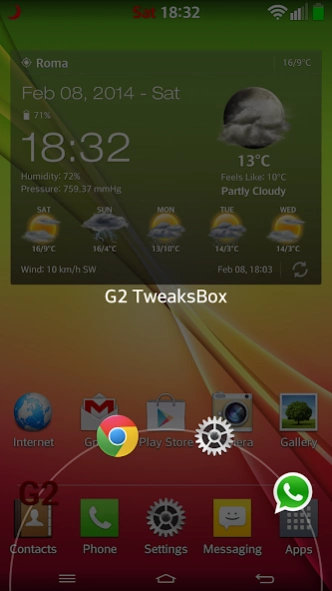
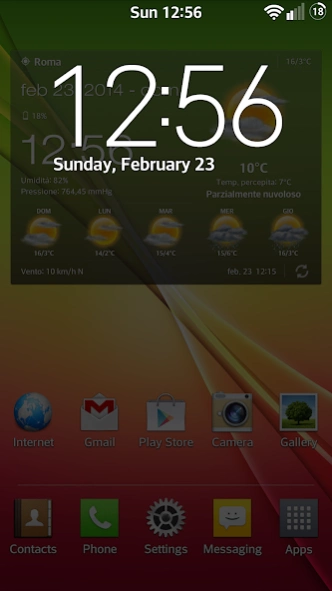
Extreme customization for your LG G2 device with 100+ options
- IT WORKS ONLY ON LG-G2 (And mostly on G-Flex,G-Pad,G-Pro,G-Pro 2)
- It Requires Root Access
- It Requires Xposed Framework
PLEASE Report any bugs here: http://forum.xda-developers.com/showthread.php?t=2549923
See all screenshots and features for KitKat: http://imgur.com/a/GuDme
See all screenshots and features for JellyBean: http://imgur.com/a/7418s
Some Features:
THEME TWEAKS
--REALTIME THEME CHANGER
--StatusBar Color
--Gradient Status Bar
--Hide Status Bar icons
--Battery icon options(hide,hide percentage from battery text)
--CM Circle Battery
--StatusBar Clock Settings(position,color,style,html,hide)
--StatusBar Carrier Text(visibility,color,custom text)
--Trasparent Status And Navigation Bar on Launcher(Works on any launcher)
--StatusBar Icon Colors(reboot is needed)
--Navigation Bar Color
--Navigation Bar Height(Works fine with any launcher,even stock)
--Gradient Navigation Bar
--Navigation Bar button colors(color,homescreen color,glowcolor)
--Navigation Bar Button Actions with custom timeout
--Ring Pad customization
--Notification Panel Color
--Brightness Slider Background Color
--Volume Slider Background Color
--Brightness Slider Seekbar Color
--Volume Slider Seekbar Color
--Date Panel Background Color
--Date Panel Label Color
--Divider color(reboot is needed)
--QSlide Panel Color
--Notification Row(Background,Pressed and Icon Color)
--QuickSettings BackGround Button Colors(Normal and Pressed)
--QuickSettings Icon and label Button Color(Active and UnActive)
--List Overscroll Edge/Glow Colors(reboot is needed)
--Hide Label Button Color
--Hide QuickSettings
--Hide Volume Slider
--Hide Brightness Slider
--Hide Carrier text on notification panel
--Battery percentage text size option
--Control Brightness level by sliding the statusbar
CALLS TWEAKS
--Call Recording
--Auto Call Recording
--Set Call History as Default Tab
--Enable Noise Suppression
--Disable VuTalk
MESSAGES TWEAKS
--Exclude contacts without phone numbers in messaging app option
--New Message screen off option
LED TWEAKS
--Change default led color for missed call
--Change default led color for incoming call
--Change default led color for missed messages
--Disable LEDs in Quite MODE
--Back led options
LOCKSCREEN TWEAKS
--See-Through Wallpaper
--Enable QUICKUNLOCK
--Enable Rotation
--Disable carrier text and icon
--Use squared icons
--Hide alarm info
--Hide charging info
--Hide pattern string
--Hide swype string
--Hide statusbar clock
--Show Remaiming Attemps
--Aosp Lockscreen
--Knock OFF on Aosp Lockscreen
--Fix Blank Screen Bug with aosp lockscreen
--Remove shadow background on aosp lockscreen
--QuickUnlock on aosp lockscreen
NOTIFICATIONS TWEAKS
--Hide input switcher notification
--Disable charging plug/unplug notifications
--Hide full battery notification
--Hide AC charging notification
--Hide slow charging notification
--Hide wireless charging notification
--Hide verizon notifications
--Hide Quietmode schedule notification
--Hide Battery saver notification
--Hide Low Battery Dialog
--Hide Airplane Mode Dialog
--Disable Data roaming notification
SOUND TWEAKS
--Disable PlugnPop when heaset are plugged in.
--Skip Tracks with volume Keys
--Disable Safety HeadSet Volume
--Auto Expand Volume Panel
--Fix Headset Hissing issues
CAMERA TWEAKS
--Enable Shutter Sound OFF
--Disable Video Recording Sound
--Disable Focus Sounds
--Disable Camera Forced Sound
--Disable low battery check
MISC TWEAKS
--Enable All Rotations
--Freeze rotation to the current one(disable forced rotation to portrait when you disable auto rotation)
--Disable NavBar
--4 way reboot menu button
--Palm swype to take a screenshot
--Enable Overflow menu button
--Enable LG Launcher Hidden Settings
--Enable Torch(Flashlight) with volume up key
--Show Extended Kernel Info
--Enable Knock OFF on NavBar
*DISCLAIMER*
I take no responsibility for any fault or damage caused by any procedures of the app. No warranties of any kind are given
About G2 TweaksBox
The company that develops G2 TweaksBox is P_Toti. The latest version released by its developer is 2.5.6.
To install G2 TweaksBox on your Android device, just click the green Continue To App button above to start the installation process. The app is listed on our website since 2014-10-13 and was downloaded 0 times. We have already checked if the download link is safe, however for your own protection we recommend that you scan the downloaded app with your antivirus. Your antivirus may detect the G2 TweaksBox as malware as malware if the download link to it.ptoti.g2_tweaksbox is broken.
How to install G2 TweaksBox on your Android device:
- Click on the Continue To App button on our website. This will redirect you to Google Play.
- Once the G2 TweaksBox is shown in the Google Play listing of your Android device, you can start its download and installation. Tap on the Install button located below the search bar and to the right of the app icon.
- A pop-up window with the permissions required by G2 TweaksBox will be shown. Click on Accept to continue the process.
- G2 TweaksBox will be downloaded onto your device, displaying a progress. Once the download completes, the installation will start and you'll get a notification after the installation is finished.
Program Details
System requirements
Download information
Pricing
Version History
version 2.5.6
posted on 2014-10-13
Several fixes and updates
version 2.5.6
posted on 2014-10-13
2.5.6:,Updated compatibility with latest XCam,Minor bugfixing.,2.5 :,Available also in Korean,Russian,Spanish,Italian,French and Hungarian Language.,Blur background effect on Notification Panel,Blur background effect on Recent Apps Window,Added an option to bypass exchange requirements,Added compatibility with latest Xdabbeb cam MOD,Now you can move the clock on the left.,Fixed and reworked a bunch of things.
Disclaimer
Official Google Play Link
We do not host G2 TweaksBox on our servers. We did not scan it for viruses, adware, spyware or other type of malware. This app is hosted by Google and passed their terms and conditions to be listed there. We recommend caution when installing it.
The Google Play link for G2 TweaksBox is provided to you by apps112.com without any warranties, representations or guarantees of any kind, so access it at your own risk.
If you have questions regarding this particular app contact the publisher directly. For questions about the functionalities of apps112.com contact us.
